
Using SemPy to determine the semantic model size in the Power BI Service


Determining the semantic model size from the Power BI Service has always been challenging. Although external tools can be used to manually connect, analyze, and obtain the semantic model size, there has never been a way to extract the size information programmatically.
With the introduction of the Semantic Link Python (SemPy) library in Microsoft Fabric, we now have a way to extract the size information programmatically.
In this article, we will use SemPy to assess the size of the semantic models. We will also explore some common errors and the potential of using SemPy to evaluate the size of all the semantic models in your Fabric tenant.
A semantic model has two size variants: offline size and memory size. Offline size applies to Import mode models, while memory size is relevant for all semantic models — Import, Direct Lake, and DirectQuery. Chris Webb wrote excellent articles that differentiate and explain the differences between these two. You can read the articles here and here.
Semantic Model Offline Size
The offline size refers to the size of the semantic model stored on disk in a compressed format. In some instances, Power BI can achieve a compression ratio of up to 10 times the actual data size. The offline size may change after a data refresh, but no other user actions, queries, or operations can alter it.
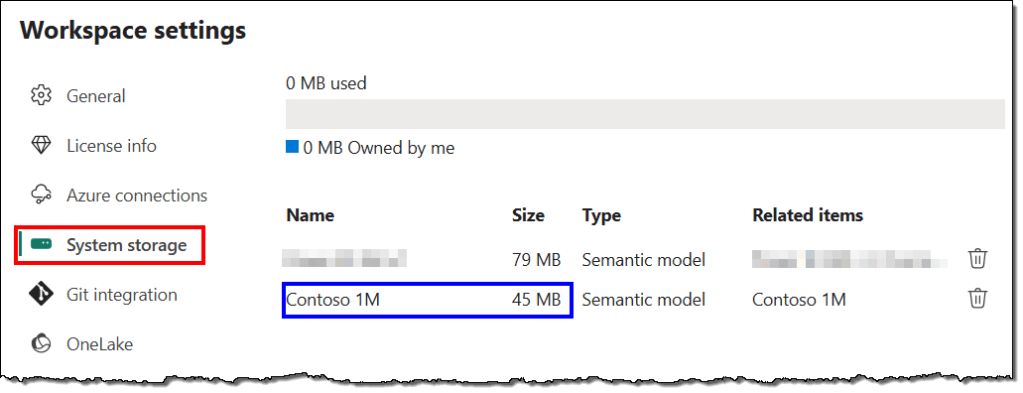
Unfortunately, the Power BI Service does not let us determine the offline size of a semantic model programmatically. However, you can manually find the offline size in the Workspace settings under System storage.
Semantic Model Memory Size
Memory size refers to the amount of memory the semantic model uses to load necessary data, relationships, row-level security, user sessions, caches, and more to execute queries and carry out various operations. The memory size fluctuates based on the data loaded, the complexity and volume of queries performed, and the number of concurrent operations like refreshes and recalculations.
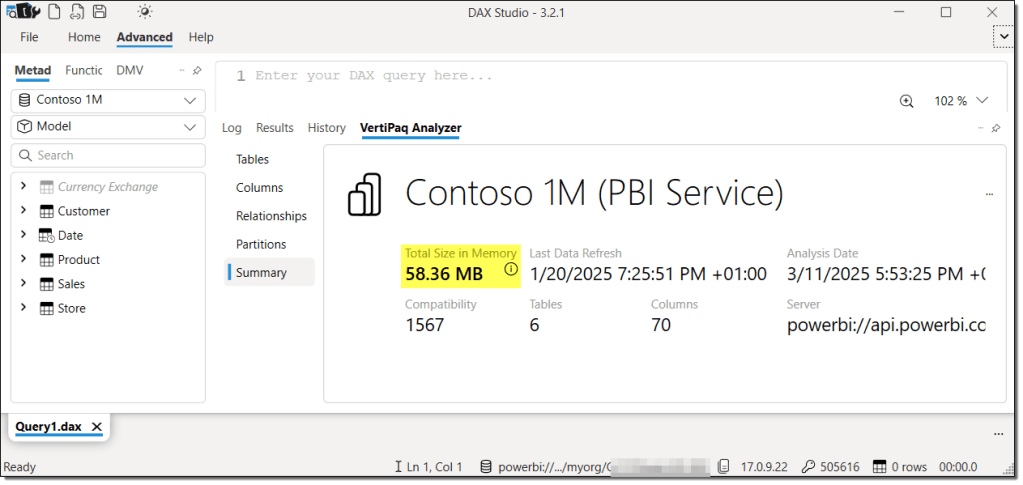
Traditionally, you could use external tools like SSMS, DAX Studio, Tabular Editor 3, and others to determine the memory size of a semantic model. Notice the size difference between SSMS and DAX Studio in the following images. This variation arises from the different methods these tools use to capture the size of the semantic model. However, the data is loaded into memory to measure its size in all cases.

Semantic Model Memory Size with SemPy
The Semantic Link Python (SemPy) library for Microsoft Fabric provides an excellent out-of-the-box option to determine the semantic model size with the model_memory_analyzer() function. It does much more than that. Read on.
The steps are simple. First, create a new Fabric notebook and attach a lakehouse to it. If you’re using Spark 3.4 or higher, the semantic link is pre-installed in the default runtime. You don’t need to write the command to install it. Just import the fabric module, specify the workspace and semantic model, and you’re all set.
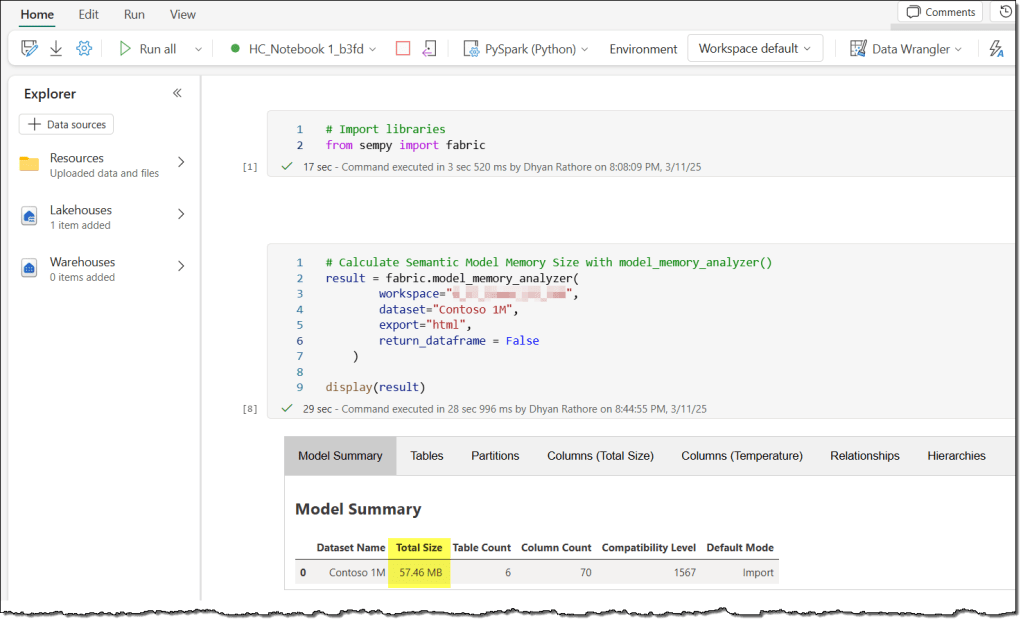
Note that the size differs from what we observed earlier with SSMS and DAX Studio. Once again, this difference is due to the method SemPy uses to determine memory size.
Here’s the code if you want to try it out simultaneously. First, a brief explanation of the arguments our snippet uses. You can check out the Microsoft documentation here for other details.
workspace: The workspace name or ID in which the semantic model exists.dataset: Name or ID of the semantic model.export: The export format for the data: “html” (display the data as an HTML table), “table” (append the data to the delta table in the attached lakehouse), or “zip” (export the data to a zip file in the attached lakehouse).return_dataframe: Whether to return the data as a DataFrame:TrueorFalse.
# Import the fabric module from SemPy
from sempy import fabric

# Calculate Semantic Model Memory Size with model_memory_analyzer()
result = fabric.model_memory_analyzer(
        workspace="<WORKSPACE_NAME_OR_ID>",
        dataset="<SEMANTIC_MODEL_NAME_OR_ID>",
        export="html",
        return_dataframe = False
    )

display(result)
The model_memory_analyzer() function provides statistics from the VertiPaq Analyzer for the semantic model. In addition to the model size, it presents some important information, such as tables and their size statistics, partitions, segment counts, columns and their size statistics, relationships, hierarchies, and more.
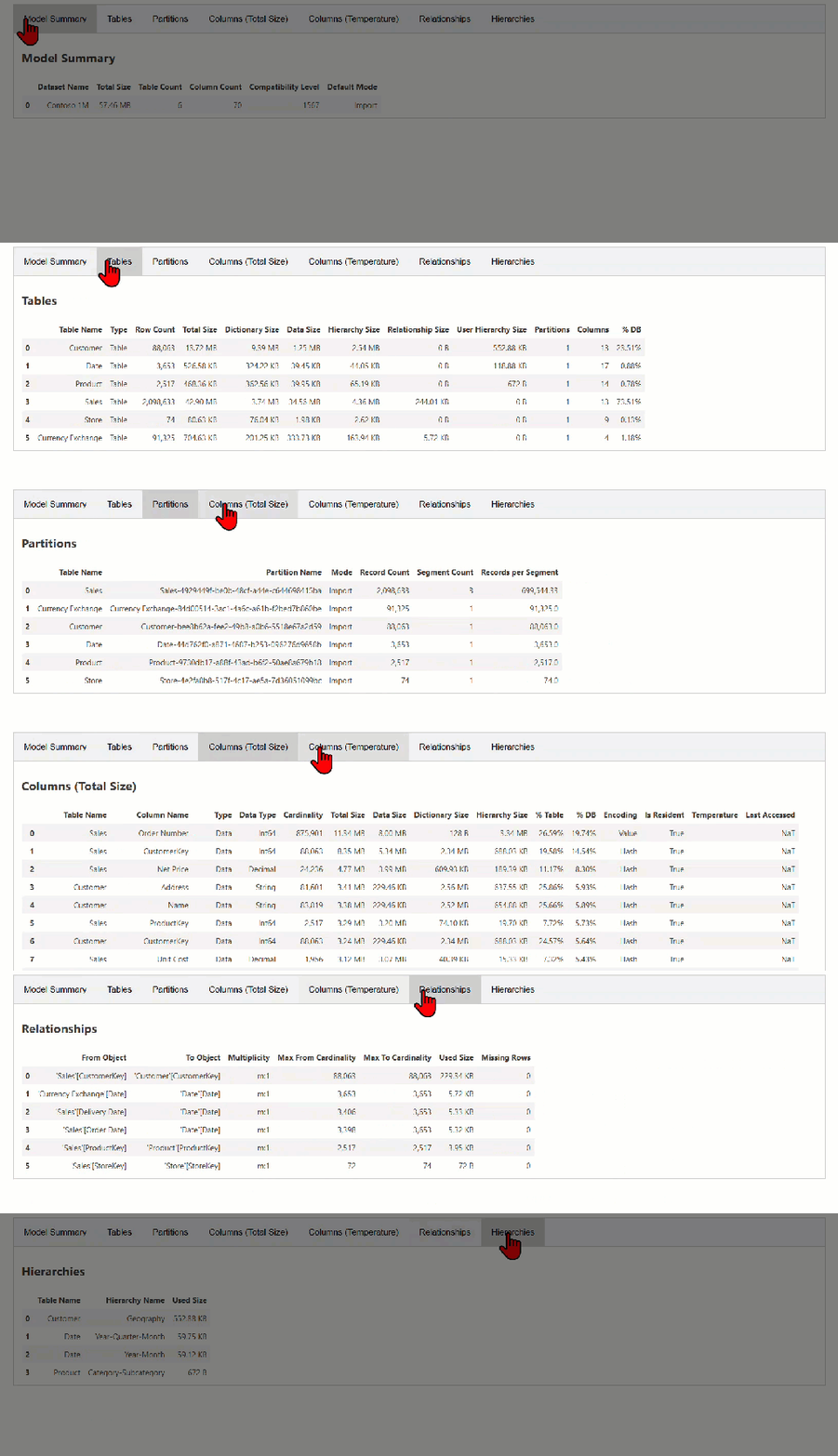
While this article won’t dive deep into every entity and column, you can explore a handy summary of most of them here.
It’s important to note that, similar to external tools, SemPy loads the model into memory for analysis, allowing us to see the model size and various VertiPaq statistics.
Common errors
The user does not have permission to call the Discover method
Most SemPy functions utilize XMLA to connect to and read data from the semantic model. Therefore, your semantic model must be in a workspace hosted on a dedicated capacity (Premium or Fabric).
You’ll encounter an error if you try to run model_memory_analyzer() on a semantic model in a shared capacity workspace.
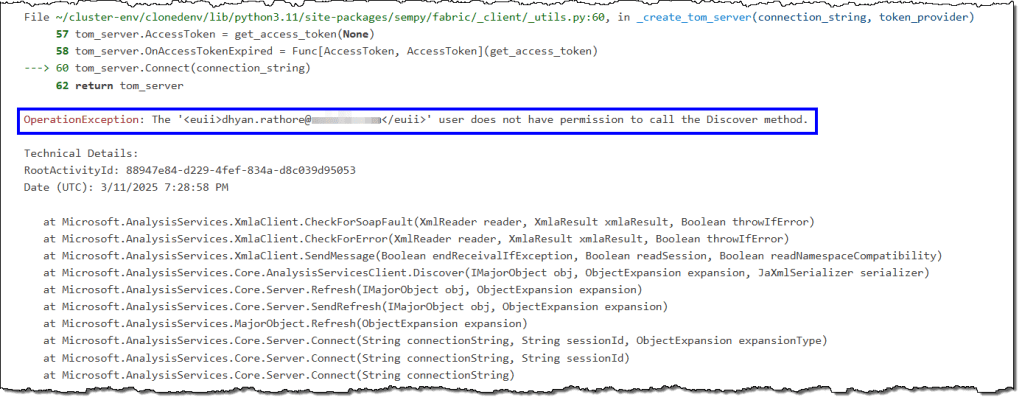
Furthermore, the capacity’s XMLA endpoint must be enabled. SemPy produces the same error if any of these conditions are unmet.

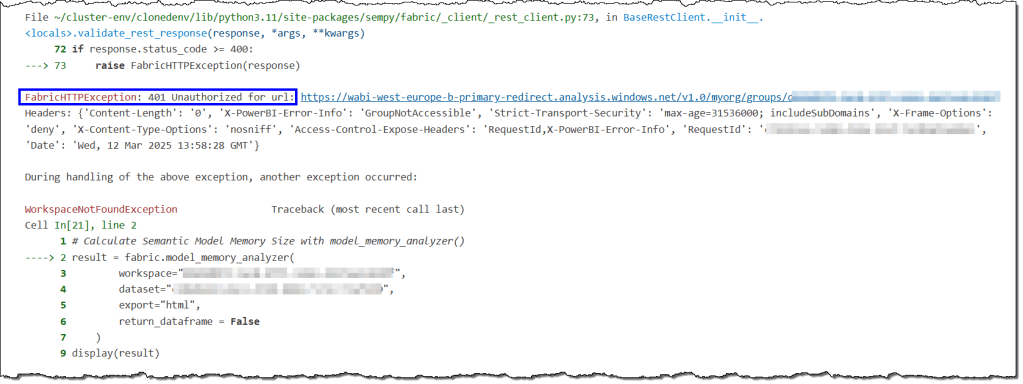
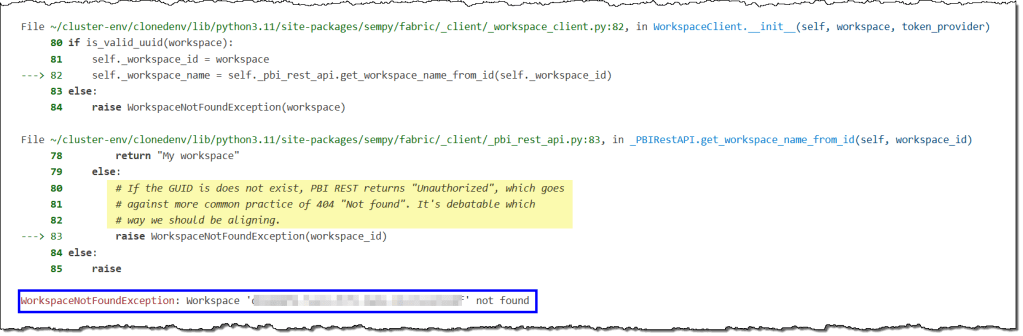
401 Unauthorized for url -> Workspace not found
These error messages are related to the same issue and can be found in two different parts of the error log. You’ll see this error if you try to use SemPy in a workspace that isn’t accessible to you.
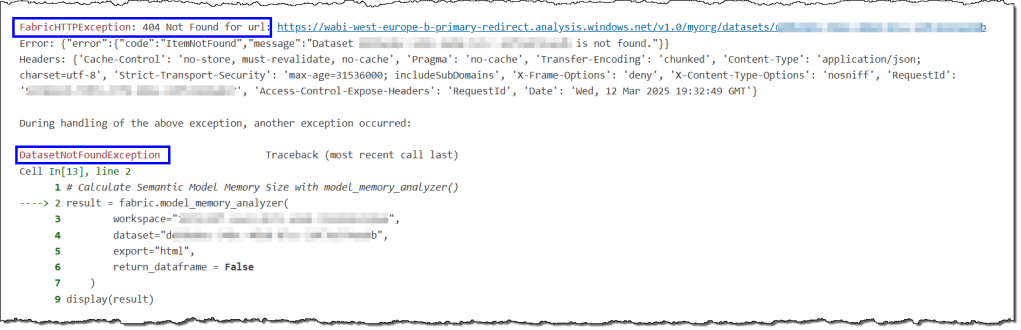
404 Not Found for url -> Dataset not found in workspace
These error messages are related and appear in two sections of the error log. You will encounter this error if you try to use SemPy on a semantic model without Build permissions. You can find details about build permissions and how to obtain them for a semantic model here and here.

Internal errors
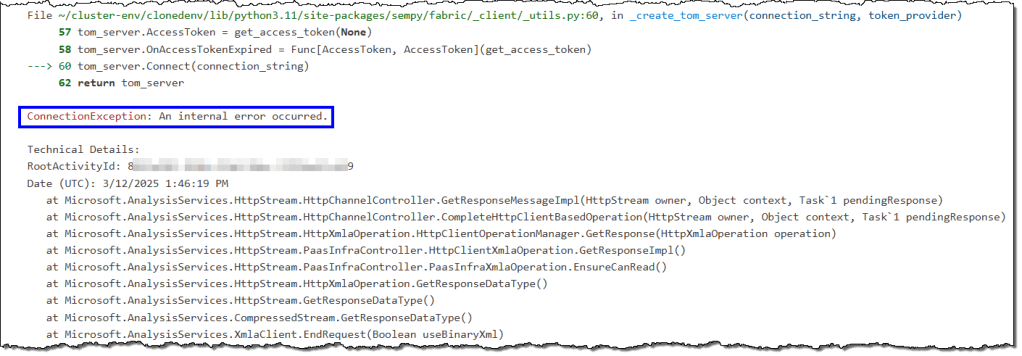
These errors can arise from various factors, such as reassigning a workspace from shared capacity to dedicated capacity. They are temporary and can be resolved by stopping the current Spark session and starting a new one.
Can we use this method to determine the size of all the semantic models in a Fabric tenant?
Theoretically, you can use this method to ascertain the memory size of all semantic models in your Fabric tenant on dedicated capacity. However, before implementing such a solution, you should consider two critical caveats.
- Capacity usage: SemPy must load the semantic models into memory to analyze them. Loading all the semantic models into memory can consume an unexpected amount of CUs. It may render capacities unusable for other operations if throttling occurs, particularly if you have many models. You might get away with this if you have a small number of models, schedule your notebooks during periods of low user activities, and have reserved Fabric capacities. Overall, it’s disastrous for your capacities.
- Access rights: SemPy requires users to have build permissions for the semantic model. In large organizations, there may be confidential, personally identifiable information (PII) or other restricted data within these semantic models. The primary method of information security is the principle of least privilege, which dictates that a user or entity should only have access to the specific data, resources, and applications necessary to complete a required task. These restrictions make it challenging to access all semantic models and may be subject to regulatory, compliance, and audit processes. Overall, your information security and audit teams will not be pleased.
Can we determine the size of all the semantic models without overloading our capacities and compromising information security practices?
Yes, there’s a more effective solution to achieve this goal. Here’s the link to a detailed article.
That’s all for this article.
 bits2BI
Leave a comment