
Using SemPy and Fabric Notebooks to extract semantic model memory usage for the entire Fabric tenant


The Fabric Capacity Metrics App provides information on the memory consumption of semantic models over the past 14 days. This data assists in monitoring the growth of the semantic model size and assigning it to an appropriate capacity.
However, the metrics app can only display data for the last 14 days, and that data is aggregated. Extracting and storing the memory size information is crucial for developing custom monitoring and tracking solutions.
In this article, we will utilize SemPy in a Fabric Notebook to extract daily semantic model memory usage statistics from the Fabric Capacity Metrics App for the entire Fabric tenant.
In an earlier article, we discussed the SemPy function model_memory_analyzer() for determining the memory size of a semantic model and why it’s not a suitable option for extracting size information on a large scale. Now, let’s explore another method to extract the memory size of semantic models from the Fabric Capacity Metrics App without straining your capacities and needing access to the models.
If you’re unfamiliar with the Fabric Capacity Metrics app, we recommend reviewing Microsoft’s documentation to understand the basics and then installing the app. Follow the steps to configure parameters and credentials until the app is fully set up.
Set up & Methodology
Justifying its name, capacities are the main driver of the Fabric Capacity Metrics App. It tracks and displays the metrics related to a capacity’s consumption. Only a capacity administrator can install the app, and they can share permissions to use it with others.
The capacity metric semantic model retrieves data using the admin’s credentials and can only display that admin’s capacities. If your organization has multiple capacities managed by different admins, you will have multiple capacity metric apps, as each admin must set up a metrics app for their respective capacities.
The first step is to ensure you obtain build permissions for all metrics semantic models from which you wish to extract semantic model size information. The second step involves reassigning the Fabric Capacity Metrics workspace(s) to a dedicated capacity (Premium or Fabric). The capacity’s XMLA endpoint must be enabled.
In a previous article, we discussed the pros and cons of hosting the metrics workspace in a dedicated capacity and explored data extraction alternatives if relocation isn’t feasible. We also outlined a use-case approach for extracting data from the capacity metrics semantic model. We recommend reviewing the previous article for full understanding.
⚠️ Note
All the DAX queries mentioned in this article were written and tested against the Fabric Capacity Metrics App version 1031 (updated on 11 Sep 2025). It may not work with older or newer versions, as the semantic model structure and object names are subject to change.
Extracting memory size from the capacity metrics app
SemPy offers the evaluate_dax() function to execute DAX queries on a semantic model. We will use this function to run a DAX query on the metrics semantic model in a Fabric notebook. This query will produce the memory usage for all active semantic models hosted on a capacity from the previous day.
// DAX query to return the memory usage statistics for the previous day
// for all the semantic models hosted on a capacity
DEFINE
  // Provide a capacity ID for the MPARAMETER
    MPARAMETER 'CapacitiesList' = "<CAPACITY_ID>"
// Filter the items for Datasets as we only want the memory information for semantic models
    VAR __DS0FilterTable =
        TREATAS ( { { "Dataset" } }, 'Items'[Item kind] )
// Filter for yesterday as today's statistics are not yet final and may change during the day
// Always extract the data for the completed days
    VAR __DS0FilterTable2 =
        TREATAS ( { { UTCTODAY () - 1 } }, 'Dates'[Day] )
// Extract Minimum, Maximum, and Median memory sizes
    VAR __DS0Core =
        SUMMARIZECOLUMNS (
            'Dates'[Day],
            Items[Item Id],
            Items[Item name],
            __DS0FilterTable,
            __DS0FilterTable2,
            "MinimumMemoryInGB", ROUND ( MIN ( 'Max Memory By Item And Hour'[Item size (GB)] ), 4 ),
            "MaximumMemoryInGB", ROUND ( MAX ( 'Max Memory By Item And Hour'[Item size (GB)] ), 4 ),
            "MedianMemoryInGB", ROUND ( MEDIAN ( 'Max Memory By Item And Hour'[Item size (GB)] ), 4 )
        )

EVALUATE
__DS0Core
A few important points to note about this DAX query:
- The
MPARAMETER“CapacitiesList” drives this query. The result set will only include the semantic models from this capacity. If you have more than one capacity, you must adjust theMPARAMETERand execute the query for each capacity. Refer to the sample code later in the article to handle this programmatically. - At the time of writing, memory information is available only for semantic models; therefore, the query includes a filter for ‘Dataset.”
- The memory size will fluctuate throughout the day; therefore, always retrieve the information for the completed days. The query retrieves the data for yesterday. You can obtain information for up to the last 14 days.
- The query retrieves the minimum, maximum, and median memory sizes in GBs used by a semantic model over the course of a day. This data provides greater flexibility and opportunities to create monitoring and tracking reports.
- We can extract the memory statistics only for the semantic models that were active yesterday and loaded into memory. If no actions, such as user activities or scheduled refreshes, were performed on the model, then it wasn’t loaded into memory. We can’t extract the memory size for these unused models.
Let’s use this query in a Fabric Notebook with SemPy. The steps are simple. First, create a new Fabric notebook and attach a lakehouse to it. If you’re using Spark 3.4 or higher, the semantic link is pre-installed in the default runtime. You don’t need to write the command to install it.
If you have only one capacity or want to extract information from only one capacity, the notebook code is simple enough. Import the fabric module from SemPy, specify the capacity metrics workspace, capacity metrics semantic model, and the DAX query, and call the evaluate_dax() function.
# Import the Semantic Link Python library
import sempy.fabric as fabric

# Declare and assign variables
workspace_Name = "<WORKSPACE_NAME_OR_ID>"
dataset_Name = "<SEMANTIC_MODEL_NAME_OR_ID>"
capacity_Id = "<CAPACITY_ID>"

# Construct DAX query
dax_query = f"""
// DAX query to return the memory usage statistics for the previous day
// for all the semantic models hosted on a capacity
DEFINE
  // Provide a capacity ID for the MPARAMETER
    MPARAMETER 'CapacitiesList' = "{capacity_Id}"
// Filter the items for Datasets as we only want the memory information for semantic models
    VAR __DS0FilterTable =
        TREATAS ( {{ "Dataset" }}, 'Items'[Item kind] )
// Filter for yesterday as today's statistics are not yet final and may change during the day
// Always extract the data for the completed days
    VAR __DS0FilterTable2 =
        TREATAS ( {{ UTCTODAY () - 1 }}, 'Dates'[Day] )
// Extract Minimum, Maximum, and Median memory sizes
    VAR __DS0Core =
        SUMMARIZECOLUMNS (
            'Dates'[Day],
            Items[Item Id],
            Items[Item name],
            __DS0FilterTable,
            __DS0FilterTable2,
            "MinimumMemoryInGB", ROUND ( MIN ( 'Max Memory By Item And Hour'[Item size (GB)] ), 4 ),
            "MaximumMemoryInGB", ROUND ( MAX ( 'Max Memory By Item And Hour'[Item size (GB)] ), 4 ),
            "MedianMemoryInGB", ROUND ( MEDIAN ( 'Max Memory By Item And Hour'[Item size (GB)] ), 4 )
        )

EVALUATE
__DS0Core
"""

# Execute DAX query on the semantic model
dax_result = fabric.evaluate_dax(
    workspace = workspace_Name,
    dataset = dataset_Name,
    dax_string = dax_query
)

display(dax_result)
Here’s a brief explanation of the arguments our snippet uses. For additional arguments and details, see the Microsoft documentation here.
workspace: The workspace name or ID in which the semantic model exists.dataset: Name or ID of the semantic model.dax_string: The DAX query to be evaluated.
Next, we can either write this data to the lakehouse as-is or take extra steps to add the current time as the data extraction date and clean up the columns. We prefer to use Spark for the transformation and for writing the data to the lakehouse, so we begin by converting the DAX query result data frame into a Spark data frame.
# Convert the DAX result to spark dataframe
dax_result_df = spark.createDataFrame(dax_result)

# Import other libraries and functions
from pyspark.sql.functions import lit, current_timestamp, to_date, col

# Add the current time as data extraction date
dax_result_df = dax_result_df.withColumn("ExtractionDate", lit(current_timestamp()))

# Rename the columns for clarity
dax_result_cleaned_df = dax_result_df.withColumnRenamed("Dates[Day]", "Date") \
               .withColumn("Date", to_date(col("Date")))\
               .withColumnRenamed("Items[ItemId]", "SemanticModelID") \
               .withColumnRenamed("Items[ItemName]", "SemanticModelName") \
               .withColumnRenamed("[MinimumMemoryInGB]", "MinimumMemoryInGB") \
               .withColumnRenamed("[MaximumMemoryInGB]", "MaximumMemoryInGB") \
               .withColumnRenamed("[MedianMemoryInGB]", "MedianMemoryInGB")

# Total rows
print(f"Total Rows: {dax_result_cleaned_df.count()}")

# Display the data
display(dax_result_cleaned_df)

# Append the data to the lakehouse delta table
dax_result_cleaned_df.write.format("delta").mode("append").saveAsTable("semantic_model_size_metrics")
You can find the complete Fabric notebook here.
Extracting memory size from multiple capacities
This makes our notebook more challenging and interesting. The exact code depends on your scenario. Let’s look at some scenarios.
Are these multiple capacities accessible from the same Capacity Metrics App?
If yes, you have to iterate through your capacities while keeping the metrics workspace and semantic model unchanged.
- Are you the capacity administrator who installed a metrics app? Great, we can use another SemPy function
list_capacities()to get the list of capacities and use them for iteration. This approach only works if you have admin rights for capacities and are not contributors to any other capacities.
Note: The list_capacities() function returns a list of capacities for which you have Admin and Contributor rights. If you have installed an app as an admin, the capacities for which you have contributor rights are not accessible from your app. In this case, you need to manually provide the list of capacities. See the next point.
# Get the list of capacities you have access to
capacities = fabric.list_capacities()

# Keep only the Id column
capacities_df = capacities[['Id']]

display(capacities_df)
- Can you access a Capacity Metrics app? Great, but you need to provide the list of capacities you can access in this app so we can iterate over them.
# Provide the list of capacities to which you've received access to their Fabric Capacity Metrics Apps.
# These capacities should be available in one Fabric Capacity Metric App.

capacities = {
    'Id': ["CAPACITY_ID1","CAPACITY_ID2","CAPACITY_ID3"]
}
capacities_df = pd.DataFrame(capacities)

display(capacities_df)
The following code snippet is a modified version for iterating over a data frame containing the capacity IDs in column “Id.” It is only for the scenario when all the listed capacities are accessible from a capacity metrics app. You will encounter a credentials error if you attempt to run it for a capacity inaccessible from the metrics semantic model specified for this DAX query.
# Declare and assign variables
workspace_Name = "<WORKSPACE_NAME_OR_ID>"
dataset_Name = "<SEMANTIC_MODEL_NAME_OR_ID>"

# Define the function to call fabric.evaluate_dax and return the result as a DataFrame
def evaluate_dax_and_return_df(capacity_id):

    dax_query = f"""
    // DAX query to return the memory usage statistics for the previous day
    // for all the semantic models hosted on a capacity
    DEFINE
    // Provide a capacity ID for the MPARAMETER
        MPARAMETER 'CapacitiesList' = "{capacity_id}"
    // Filter the items for Datasets as we only want the memory information for semantic models
        VAR __DS0FilterTable =
            TREATAS ( {{ "Dataset" }}, 'Items'[Item kind] )
    // Filter for yesterday as today's statistics are not yet final and may change during the day
    // Always extract the data for the completed days
        VAR __DS0FilterTable2 =
            TREATAS ( {{ UTCTODAY () - 1 }}, 'Dates'[Day] )
    // Extract Minimum, Maximum, and Median memory sizes
        VAR __DS0Core =
            SUMMARIZECOLUMNS (
                'Dates'[Day],
                Items[Item Id],
            Items[Item name],
            __DS0FilterTable,
            __DS0FilterTable2,
            "MinimumMemoryInGB", ROUND ( MIN ( 'Max Memory By Item And Hour'[Item size (GB)] ), 4 ),
            "MaximumMemoryInGB", ROUND ( MAX ( 'Max Memory By Item And Hour'[Item size (GB)] ), 4 ),
            "MedianMemoryInGB", ROUND ( MEDIAN ( 'Max Memory By Item And Hour'[Item size (GB)] ), 4 )
            )
    EVALUATE
    __DS0Core
"""

    # Execute DAX query on the semantic model
    dax_result = fabric.evaluate_dax(
        workspace=workspace_Name,
        dataset=dataset_Name,
        dax_string=dax_query
    )
    # Convert the result to a pandas DataFrame
    result_df = pd.DataFrame(dax_result)
    return result_df

# Apply the function to each row and collect the results into a list
results = capacities_df['Id'].apply(lambda x: evaluate_dax_and_return_df(x)).tolist()

# Combine the list of DataFrames into a single DataFrame, ignoring empty DataFrames
combined_dax_result_df = pd.concat([df for df in results if not df.empty], ignore_index=True)

# Show the result
display(combined_dax_result_df)
You can find the complete Fabric notebook for this scenario here.
Are these multiple capacities accessible from different Capacity Metrics Apps?
If so, you should appropriately iterate over your capacities, metrics workspace, and semantic model. We will not provide the notebook snippet for this scenario. Think of it as a DIY project and test your knowledge.
Hint: Create a data frame including the capacity ID, metrics workspace ID, and semantic model ID, then iterate over it in your code. From the earlier snippet, the logic for collecting the results into a list shall work with minor adjustments, and combining all the results into a single data frame shall work as is.
Common errors
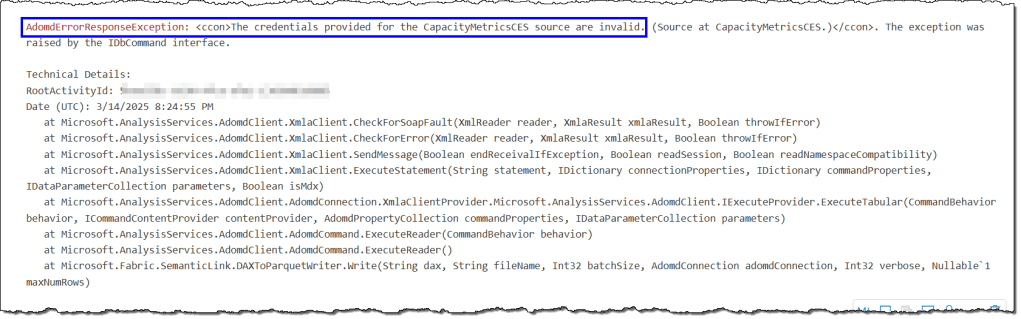
The credentials provided for the CapacityMerticsCES are invalid
This error occurs when you attempt to access a capacity unavailable in the metrics semantic model provided in your DAX query. It indicates that the capacity administrator whose credentials are listed in the metrics semantic model cannot access the capacity you are trying to reach. You must use the appropriate metrics workspace and semantic model to resolve this.
The remaining errors should be related to SemPy struggling to connect with the workspace and semantic model due to capacity settings or your access rights. We discussed them in detail here.
That’s all for this article.
 bits2BI
Leave a comment