
A comprehensive guide on how to obtain user identity and authentication claims in a .NET Core Azure Functions App


Azure App Service provides built-in identity and authentication support, making user identification and authentication a hassle-free, low-effort task.
For ASP.NET 4.6 (and above) apps, ClaimsPrincipal.Current is populated with authenticated user’s identities and claims, enabling developers to follow the standard .NET code patterns. However, in .NET Core-based Azure Functions, ClaimsPrincipal.Current is not populated automatically and Claims must be obtained by different means.
This article will present four methods to access user identity and claims information in the .NET Core (C#) code.
Prerequisites
- An active Microsoft Azure subscription
- Azure Functions App
When App Service Authentication is enabled, every incoming HTTP request passes through the identity provider’s authentication and authorization module before being handled by the application code. The information regarding authenticated clients is available as a ClaimsPrincipal object and in special headers.
Hmm… How do I enable App Service Authentication?
ClaimsPrincipal as a Binding Parameter
The most straightforward method is to obtain the ClaimsPrincipal object from the Function’s binding parameters. Include the ClaimsPrincipal as an additional parameter in the function signature. The object will be automatically injected, similar to how ILogger is injected.
using Microsoft.AspNetCore.Http;
using Microsoft.AspNetCore.Mvc;
using Microsoft.Azure.WebJobs;
using Microsoft.Azure.WebJobs.Extensions.Http;
using Microsoft.Extensions.Logging;
using System.Security.Claims;

// DEMO: Get ClaimsPrincipal as a binding parameter
namespace ClaimsDemo.Function
{
    public static class ClaimsDemo
    {
    	// Pass ClaimsPrincipal parameter in the function signature
        [FunctionName("ClaimsDemo")]
        public static IActionResult Run
            ([HttpTrigger(AuthorizationLevel.Anonymous, "get", "post", Route = null)]
             HttpRequest req, ILogger log, ClaimsPrincipal claimIdentity)
        {
            log.LogInformation("User ID: " + claimIdentity.Identity.Name);

            log.LogInformation("Claim Type : Claim Value");

            foreach (Claim claim in claimIdentity.Claims)
            {
                log.LogInformation(claim.Type + " : " + claim.Value + "\n");
            }

            return new OkObjectResult("Success");
        }
    }
}

ClaimsPrincipal from the Request Context
The ClaimsPrincipal object is also available as part of the request context and can be extracted from the HttpRequest.HttpContext.
using Microsoft.AspNetCore.Http;
using Microsoft.AspNetCore.Mvc;
using Microsoft.Azure.WebJobs;
using Microsoft.Azure.WebJobs.Extensions.Http;
using Microsoft.Extensions.Logging;
using System.Security.Claims;

// DEMO: Get ClaimsPrincipal from the request context
namespace ClaimsDemo.Function
{
    public static class ClaimsDemo
    {
        [FunctionName("ClaimsDemo")]
        public static IActionResult Run
            ([HttpTrigger(AuthorizationLevel.Anonymous, "get", "post", Route = null)]
             HttpRequest req, ILogger log)
        {
            ClaimsPrincipal claimIdentity = req.HttpContext.User;

            log.LogInformation("User ID: " + claimIdentity.Identity.Name);

            log.LogInformation("Claim Type : Claim Value");

            foreach (Claim claim in claimIdentity.Claims)
            {
                log.LogInformation(claim.Type + " : " + claim.Value + "\n");
            }

            return new OkObjectResult("Success");
        }
    }
}
The advantage of the ClaimsPrincipal is the ease of referring and working with the individual claims presented by the identity allowing for a quick validation or design/decision logic implementation.
User Claims from the Request Headers
App Service passes user claims to the app by using special request headers. External requests aren’t allowed to set these headers, so they are present only if set by the App Service. Few example headers:
X-MS-CLIENT-PRINCIPAL-ID --User ID
X-MS-CLIENT-PRINCIPAL-NAME --User Name
X-MS-CLIENT-PRINCIPAL-IDP --Identity Provider's ID
X-MS-CLIENT-PRINCIPAL --Claims
using Microsoft.AspNetCore.Http;
using Microsoft.AspNetCore.Mvc;
using Microsoft.Azure.WebJobs;
using Microsoft.Azure.WebJobs.Extensions.Http;
using Microsoft.Extensions.Logging;
using System.Security.Claims;
using System.Linq;
using Newtonsoft.Json;
using System;
using System.Collections.Generic;

// DEMO: Get user Claims from the Request Headers
// Adopted from https://github.com/MaximRouiller/MaximeRouiller.Azure.AppService.EasyAuth
namespace ClaimsDemo.Function
{
    public static class ClaimsDemo
    {
        [FunctionName("ClaimsDemo")]
        public static IActionResult Run
        ([HttpTrigger(AuthorizationLevel.Anonymous, "get", "post", Route = null)]
        HttpRequest req, ILogger log)
        {

            //Extract User ID and Claims from the request headers
            var principal_name = req.Headers["X-MS-CLIENT-PRINCIPAL-NAME"].FirstOrDefault();
            var principal_Id = req.Headers["X-MS-CLIENT-PRINCIPAL-ID"].FirstOrDefault();
            string easyAuthProvider = req.Headers["X-MS-CLIENT-PRINCIPAL-IDP"].FirstOrDefault();
            string clientPrincipalEncoded = req.Headers["X-MS-CLIENT-PRINCIPAL"].FirstOrDefault();

            log.LogInformation("User ID: " + principal_name);
            log.LogInformation("User Principal ID: " + principal_Id);
            log.LogInformation("EasyAuth Provider: " + easyAuthProvider);
            log.LogInformation("Encoded Client Principal: " + clientPrincipalEncoded);

            //Decode the Client Principal
            byte[] decodedBytes = Convert.FromBase64String(clientPrincipalEncoded);
            string clientPrincipalDecoded = System.Text.Encoding.Default.GetString(decodedBytes);
            // log.LogInformation("Decoded Client Principal: " + clientPrincipalDecoded);

            ClientPrincipal clientPrincipal = JsonConvert.DeserializeObject<ClientPrincipal>(clientPrincipalDecoded);
            IEnumerable<Claim> claims = clientPrincipal.Claims.Select(x => new Claim(x.Type, x.Value));

            log.LogInformation("Claim Type : Claim Value");

            foreach (Claim claim in claims)
            {
                log.LogInformation(claim.Type + " : " + claim.Value + "\n");
            }

            return new OkObjectResult("Success");
        }
    }

    public class ClientPrincipal
    {
        [JsonProperty("auth_typ")]
        public string AuthenticationType { get; set; }
        [JsonProperty("claims")]
        public IEnumerable<UserClaim> Claims { get; set; }
        [JsonProperty("name_typ")]
        public string NameType { get; set; }
        [JsonProperty("role_typ")]
        public string RoleType { get; set; }
    }

    public class UserClaim
    {
        [JsonProperty("typ")]
        public string Type { get; set; }
        [JsonProperty("val")]
        public string Value { get; set; }
    }
}

User Claims from the Authentication Tokens
The authentication servers inject provider-specific tokens into the request headers with the authenticated user’s details and the claims. These tokens can also be used to get access to the user information and claims in the code.
Token headers are JSON web tokens (JWTs). JWTs are encrypted and must be decrypted before any reference.
In our demo code, we will obtain the claims from the Azure AD ID token header: X-MS-TOKEN-AAD-ID-TOKEN
using Microsoft.AspNetCore.Http;
using Microsoft.AspNetCore.Mvc;
using Microsoft.Azure.WebJobs;
using Microsoft.Azure.WebJobs.Extensions.Http;
using Microsoft.Extensions.Logging;
using System.Security.Claims;
using System.IdentityModel.Tokens.Jwt;

// DEMO: Get user Claims from the Authentication Tokens
namespace ClaimsDemo.Function
{
    public static class ClaimsDemo
    {
        [FunctionName("ClaimsDemo")]
        public static IActionResult Run
        ([HttpTrigger(AuthorizationLevel.Anonymous, "get", "post", Route = null)]
        HttpRequest req, ILogger log)
        {

            //Extract AAD ID Token from the request headers
            var userIDToken = req.Headers["X-MS-TOKEN-AAD-ID-TOKEN"];

            log.LogInformation("Encrypted JWT: " + userIDToken);

            //Read and decrypt the JWT
            var jwttoken = new JwtSecurityTokenHandler().ReadJwtToken(userIDToken) as JwtSecurityToken;

            log.LogInformation("Decrypted JWT:");
            log.LogInformation("Claim Type : Claim Value");

            //Extract the claims from the JWT
            foreach (Claim claim in jwttoken.Claims)
            {
                log.LogInformation(claim.Type + " : " + claim.Value + "\n");
            }

            return new OkObjectResult("Success");
        }
    }
}
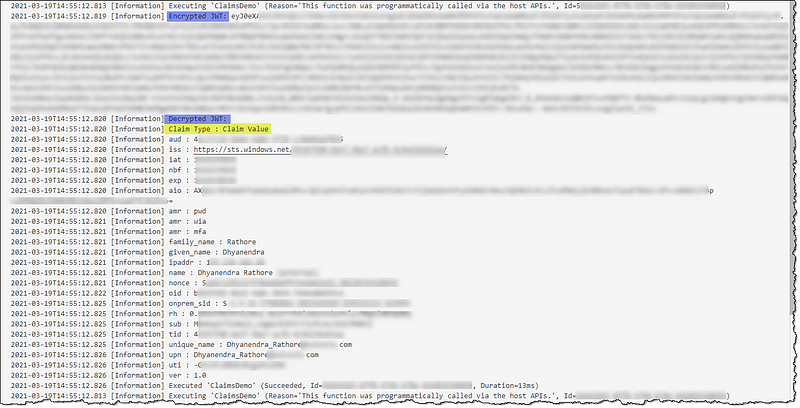
What about token headers from other providers?
Want to peek inside your JWT without any code?
Pro Tip
If you encounter a token can’t be null error, ensure that the Token Store is set to On in the App’s Authentication/Authorization settings.

3rd Party
Just for the sake of the completion of the conversation, there are some 3rd party open-source middleware components out there to make things easy for us.
Now we’re equipped with the apt tool for the job.
Conclusion
We explored different methods of obtaining user identity and claims in a .NET Core app. We demonstrated the ease, simplicity, and complexities of working with claims with demo programs.
 bits2BI
Leave a comment